

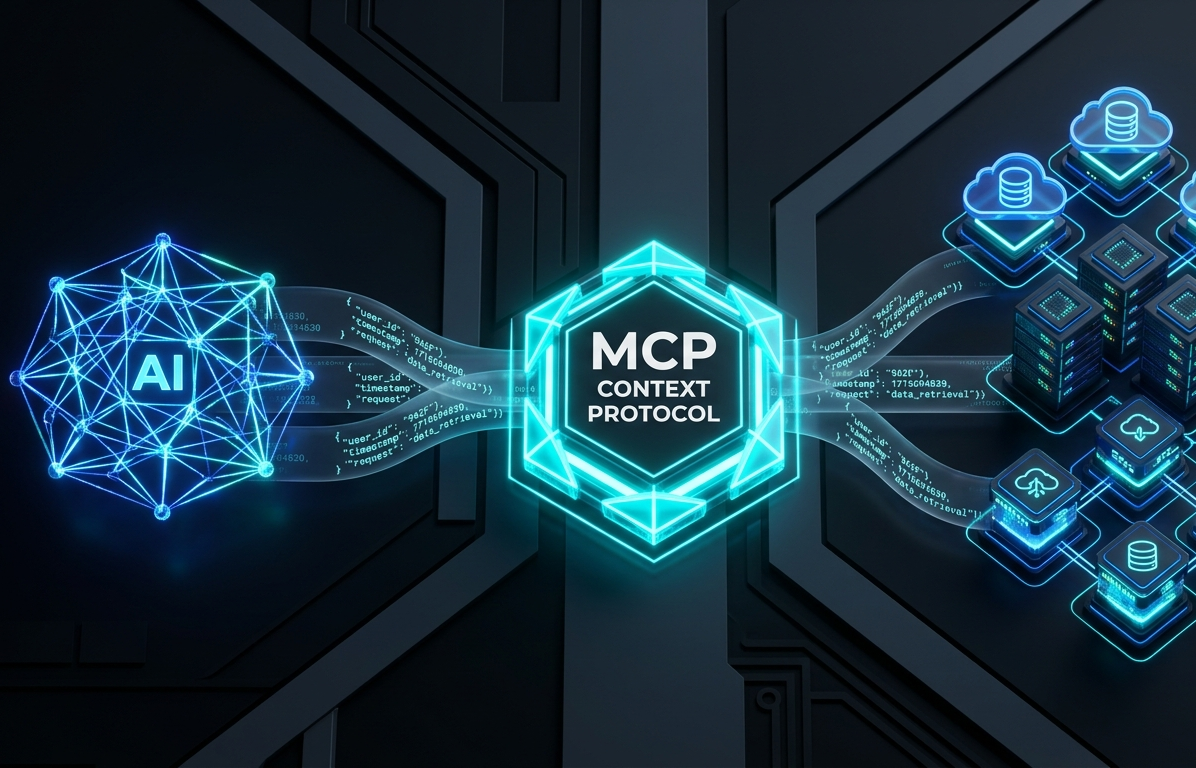
Connecting artificial intelligence models to enterprise data has historically been a messy, custom-coded affair. As organizations move from simple chatbot interfaces to autonomous agentic workflows, engineering teams face a severe integration bottleneck: every single combination of Large Language Model (LLM) host and enterprise backend requires a dedicated software wrapper.
The Model Context Protocol (MCP)—an open-standard client-server protocol initially introduced by Anthropic and governed under open-source Linux Foundation umbrella initiatives—replaces this brittle, custom wrapper approach. MCP establishes a unified, secure layer for LLMs to dynamically discover, query, and execute capabilities across enterprise software ecosystems.
This comprehensive guide breaks down the architecture, security models, deployment patterns, and operational trade-offs of implementing MCP in production environments.
Table of Contents
Executive Summary & Key Takeaways
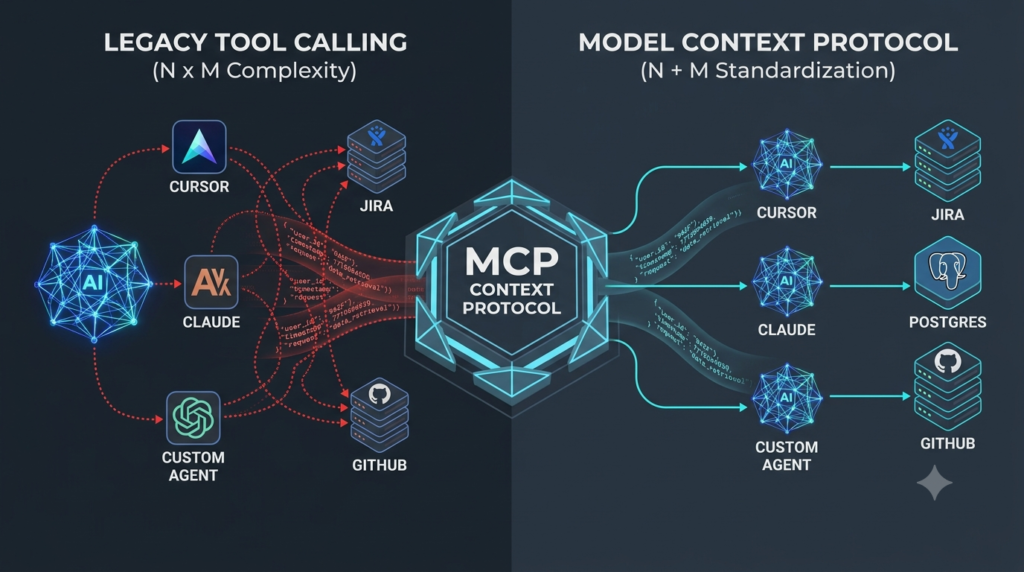
The Integration Shift: MCP shifts enterprise AI architectures from an N x M integration problem (writing unique API wrappers for every LLM host and internal service pair) to an N + M standard interface.
Protocol Core: Built on top of JSON-RPC 2.0, MCP exposes three core server primitives: Tools (executable actions with side effects), Resources (read-only file or data endpoints), and Prompts (reusable context templates).
Security & Auth: Remote MCP deployments mandate OAuth 2.1 with Proof Key for Code Exchange (PKCE S256) and rely on Client ID Metadata Documents (CIMD) to verify client identities without static API key management.
Token Efficiency: By shifting from static prompt injection to dynamic capability negotiation, MCP drastically reduces context window bloat and lowers operational token costs.
Cloud Scaling: Modern remote MCP servers operate statelessly over Streamable HTTP transports, making them natively deployable on container orchestrators like Kubernetes.
1. The N x M API Fragment Crisis
In a standard enterprise stack, an AI application (“host”) needs to read from databases, invoke microservices, run code, and retrieve customer records. Historically, developers accomplished this using standard tool calling (function calling). The developer wrote hardcoded JSON Schemas into the model’s system prompt, handled the tool calls returned by the model, manually dispatched requests to REST APIs, and fed the responses back into the context window.
LEGACY TOOL CALLING (N x M Complexity)
[Claude Desktop] — Custom Wrapper –> [Jira API]
[Custom Agent] — Custom Wrapper –> [PostgreSQL]
[Cursor Editor] — Custom Wrapper –> [GitHub API]
This legacy pattern presents three severe operational bottlenecks:
- Exponential Development Costs: Connecting N host interfaces to M internal microservices requires building and maintaining N x M separate integration wrappers.
- System Prompt Bloat: Pre-injecting every possible tool schema into every prompt context consumes precious tokens before the user even types a query.
- Inconsistent Security Controls: Each custom API bridge implements identity propagation, rate limiting, and access controls differently, creating security blind spots.
MCP solves this by introducing a standardized protocol boundary:
MODEL CONTEXT PROTOCOL (N + M Standardization)
[Claude Desktop] ┐                                   ┌--> [Jira MCP Server]
[Custom Agent]   ├──> [ MCP LAYER ] ───┼--> [PostgreSQL MCP Server]
[Cursor Editor]    ┘                                   └--> [GitHub MCP Server]
2. Core Protocol Architecture & Primitives
An MCP ecosystem consists of three primary entities operating in a client-server architecture:
                          HOST CLIENT
 (e.g., Enterprise Agent Workspace, IDE, Desktop Assistant)
                                    |
   +-----------------------------------------------------------+
   |                       MCP CLIENT                                     |
   +-----------------------------------------------------------+
                                  |
                                  | Transports: stdio | Streamable HTTP
                                  v
                         MCP SERVER
 (Exposes internal tools, databases, microservices, repositories)
                                   |
  +-------------------+ +-------------------+ +---------------+
 |  TOOLS (Actions)  | | RESOURCES (Data)  | | PROMPTS (Tmpl)
  +-------------------+ +-------------------+ +---------------+
The Architectural Triad
- Host Application: The top-level software runtime (such as an IDE, internal enterprise assistant, or automated agent framework) that coordinates LLM interactions.
- MCP Client: A protocol-compliant library running inside the host application that maintains connection state, negotiates capabilities, and formats JSON-RPC requests.
- MCP Server: A lightweight microservice that exposes backend capabilities to the client via standardized MCP protocol endpoints.
Protocol Primitives
MCP servers expose three fundamental capability types to connected clients:
- Tools (Executable Actions): Functions exposed to the LLM to perform actions that typically cause side effects (e.g., create_jira_issue, execute_sql_query). Every tool includes a JSON Schema (2020-12) defining its required input parameters.
- Resources (Read-Only Data): Standardized URIs (e.g., file:///logs/app.log or postgres://analytics/users) that allow the host to fetch structured or unstructured data directly into the model’s context window.
- Prompts (Workflow Templates): Pre-configured context templates and operational guidelines stored on the server that help structure complex LLM multi-turn interactions.
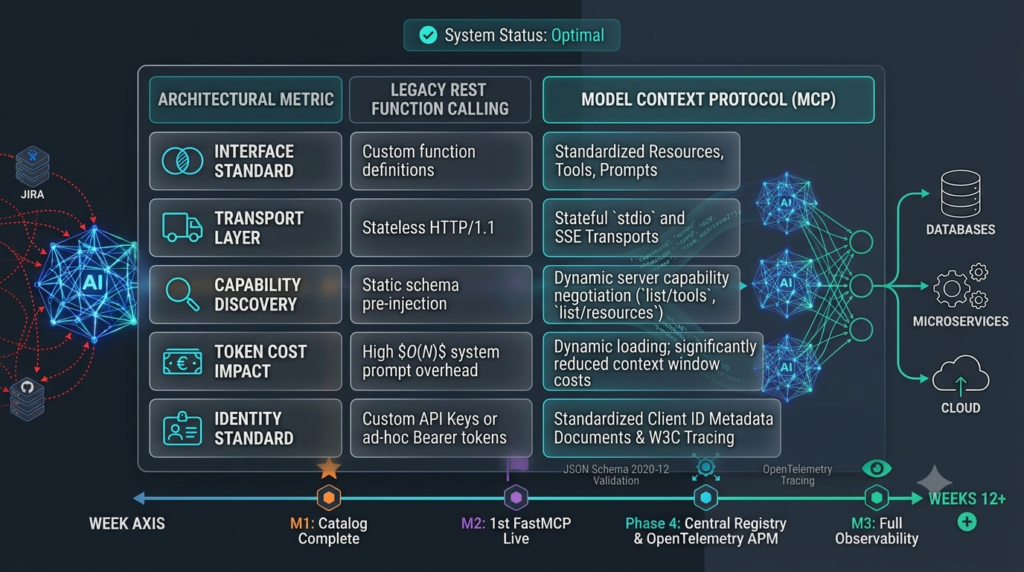
3. Comparison: MCP vs. Legacy Tool Calling
| Architectural Metric | Legacy REST Function Calling | Model Context Protocol (MCP) |
| Interface Standard | Ad-hoc REST/GraphQL Wrappers | Unified JSON-RPC 2.0 Specification |
| Transport Layer | HTTP/1.1 REST Endpoints | Inter-process stdio or Streamable HTTP |
| Capability Discovery | Static pre-injection into system prompt | Dynamic negotiation via tools/list requests |
| Token Cost Impact | High O(N) system prompt token overhead | Low token consumption via dynamic schema fetching |
| Identity Standard | Static API Keys or Custom Bearer tokens | OAuth 2.1 + PKCE (S256) + Client ID Metadata (CIMD) |
| Observability | Fragmented per-service logging | Standardized W3C Trace Context in _meta payloads |
4. Securing MCP in Enterprise Production
Deploying remote MCP servers across enterprise cloud networks requires strict security controls to prevent unauthorized data access or unvetted remote code execution.
Identity Verification via Client ID Metadata Documents (CIMD)
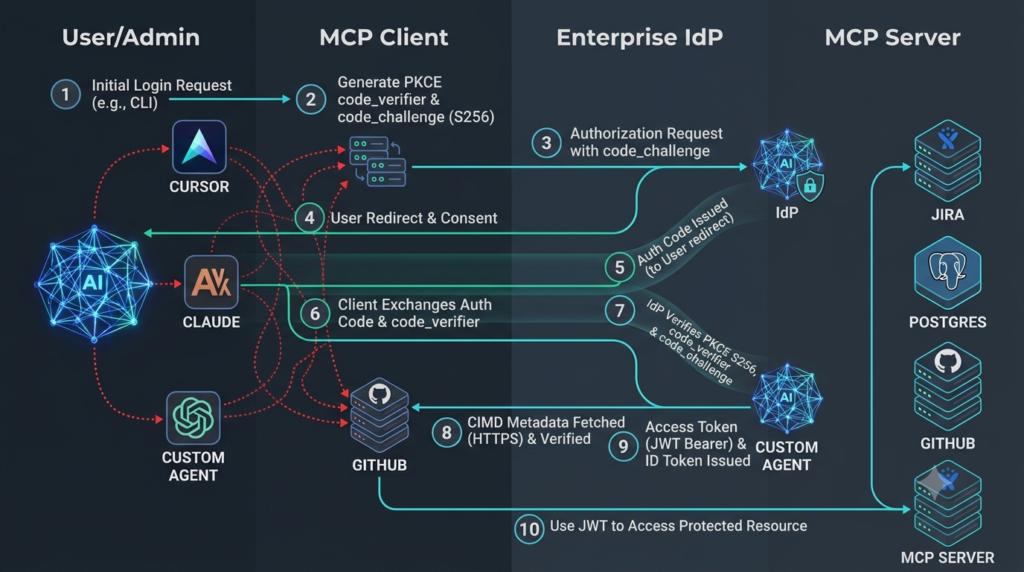
Traditional OAuth dynamic client registration (RFC 7591) can be cumbersome in decentralized enterprise agent topologies. MCP leverages Client ID Metadata Documents (CIMD).
When a client attempts to connect to a remote MCP server, the server verifies the client’s identity by fetching a signed, hosted JSON metadata document located at the client’s HTTPS origin endpoint. This verifies the client’s identity without forcing developers to manually pre-register client credentials on every MCP server.
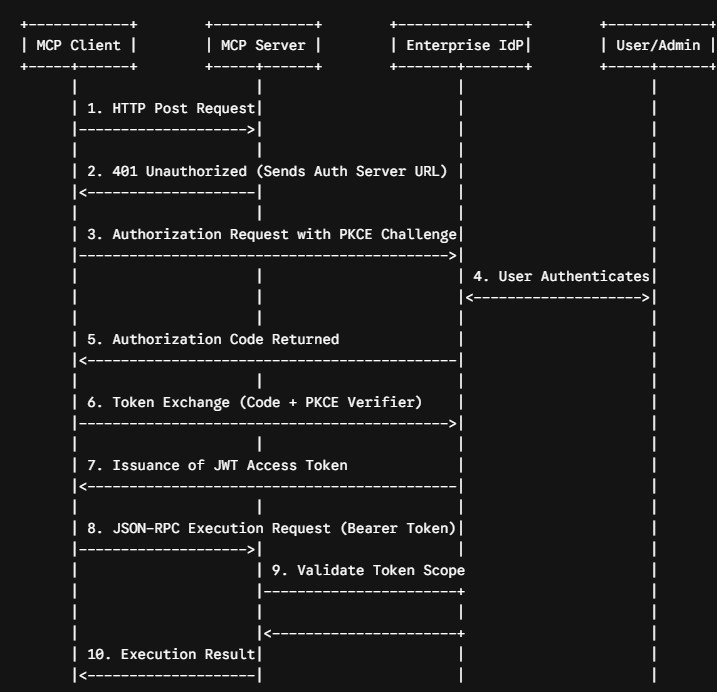
OAuth 2.1 Authorization Sequence
For remote HTTP network transports, MCP mandates OAuth 2.1 with Proof Key for Code Exchange (PKCE S256). The following sequence illustrates how an enterprise MCP client authenticates against a remote MCP server backed by an identity provider (IdP):
Enforcing Role-Based Access Control (RBAC)
The MCP server must validate incoming JWT bearer token scopes before executing any requested tool. Here is a production-grade Python implementation using the FastMCP framework enforcing least-privilege access:
import jwt
from fastmcp import FastMCP, Context, FastMCPError
from functools import wraps

mcp = FastMCP("Enterprise Customer Analytics")

JWT_ISSUER = "https://auth.enterprise.com/"
JWT_ALGORITHM = "RS256"
PUBLIC_KEY = "-----BEGIN PUBLIC KEY-----\n...\n-----END PUBLIC KEY-----"

def require_scope(required_scope: str):
    """Decorator to enforce OAuth 2.1 scope validation on MCP tools."""
    def decorator(func):
        @wraps(func)
        async def wrapper(*args, ctx: Context = None, **kwargs):
            # Extract request metadata injected by the HTTP transport layer
            meta = ctx.request_context.meta if ctx else None
            auth_header = meta.get("authorization") if meta else None

            if not auth_header or not auth_header.startswith("Bearer "):
                raise FastMCPError("UNAUTHORIZED", "Missing or invalid Authorization header")

            token = auth_header.split(" ")[1]
            try:
                payload = jwt.decode(
                    token,
                    PUBLIC_KEY,
                    algorithms=[JWT_ALGORITHM],
                    issuer=JWT_ISSUER
                )
                scopes = payload.get("scope", "").split(" ")
                if required_scope not in scopes:
                    raise FastMCPError("FORBIDDEN", f"Insufficient scope. Required: {required_scope}")
            except jwt.PyJWTError as e:
                raise FastMCPError("UNAUTHORIZED", f"Token validation failed: {str(e)}")

            return await func(*args, ctx=ctx, **kwargs)
        return wrapper
    return decorator

@mcp.tool()
@require_scope("analytics:read")
async def query_customer_lifetime_value(customer_id: str, ctx: Context) -> float:
    """Calculates customer lifetime value given a unique customer ID."""
    # Internal execution logic here
    return 42500.50
5. Deploying Remote Learn Model Context Protocol with Python Servers on Kubernetes
To scale remote MCP services statelessly, enterprise infrastructure teams can deploy servers inside containerized environments managed by Kubernetes.
Production Kubernetes Deployment Manifest
The following manifest configures a high-availability MCP microservice running with hardened security settings, health probes, and resource constraints:
apiVersion: apps/v1
kind: Deployment
metadata:
  name: mcp-customer-service
  namespace: ai-infrastructure
  labels:
    app.kubernetes.io/name: mcp-customer-service
    app.kubernetes.io/part-of: agentic-platform
spec:
  replicas: 3
  selector:
    matchLabels:
      app: mcp-customer-service
  template:
    metadata:
      labels:
        app: mcp-customer-service
    spec:
      securityContext:
        runAsNonRoot: true
        runAsUser: 10001
        runAsGroup: 10001
        fsGroup: 10001
      containers:
      - name: mcp-server
        image: internal-registry.enterprise.com/mcp/customer-service:v2.4.1
        imagePullPolicy: IfNotPresent
        securityContext:
          allowPrivilegeEscalation: false
          readOnlyRootFilesystem: true
          capabilities:
            drop:
            - ALL
        ports:
        - name: http-stream
          containerPort: 8080
        env:
        - name: PORT
          value: "8080"
        - name: ENVIRONMENT
          value: "production"
        resources:
          limits:
            cpu: "1000m"
            memory: "512Mi"
          requests:
            cpu: "100m"
            memory: "128Mi"
        readinessProbe:
          httpGet:
            path: /healthz
            port: 8080
          initialDelaySeconds: 5
          periodSeconds: 10
        livenessProbe:
          httpGet:
            path: /healthz
            port: 8080
          initialDelaySeconds: 15
          periodSeconds: 20
---
apiVersion: v1
kind: Service
metadata:
  name: mcp-customer-service
  namespace: ai-infrastructure
spec:
  type: ClusterIP
  ports:
  - port: 80
    targetPort: 8080
    name: http
    protocol: TCP
  selector:
    app: mcp-customer-service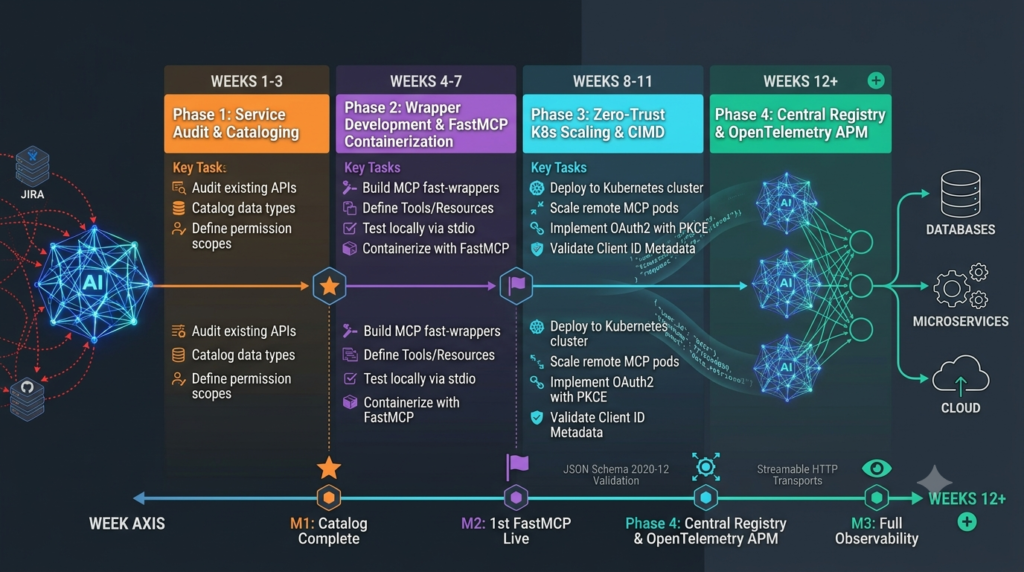
6. Phased Enterprise Implementation Roadmap
Migrating existing API architectures to MCP should follow a structured four-phase approach:
[Phase 1: Audit & Catalog] ---> [Phase 2: Wrapper Dev] ---> [Phase 3: Zero-Trust] ---> [Phase 4: Registry & APM]
            (Weeks 1-3)                       (Weeks 4-7)                         (Weeks 8-11)                      (Weeks 12+)
Phase 1: Service Cataloging & Protocol Auditing (Weeks 1–3)
- Inventory all internal REST, gRPC, and database interfaces currently exposed to AI agents.
- Identify high-value read targets (suitable for MCP Resources) versus transactional targets with side effects (suitable for MCP Tools).
- Map authorization boundaries and identify required OAuth scopes for each capability.
Phase 2: Microservice Wrapper Development (Weeks 4–7)
- Build stateless MCP server wrappers using standard SDKs (Python FastMCP, TypeScript MCP SDK).
- Write explicit JSON Schemas (2020-12) for all tool parameters, including strict typing and descriptions.
- Validate local tool execution over standard stdio transport using local developer testing suites.
Phase 3: Zero-Trust Security Enforcement & Scaling (Weeks 8–11)
- Deploy MCP servers to Kubernetes using Streamable HTTP transports.
- Configure API Gateways to handle OAuth 2.1 authorization PKCE token verification.
- Configure Client ID Metadata Documents (CIMD) endpoints for automated client verification.
Phase 4: Internal MCP Registries & Observability (Weeks 12+)
- Establish a centralized internal MCP Server Registry allowing agent teams to dynamically discover tools.
- Wire up OpenTelemetry collectors to ingest trace contexts directly from MCP request metadata (_meta).
- Set up monitoring dashboards to track tool invocation latency, error rates, and token overhead.
7. Risks, Limitations, and Architectural Trade-Offs
While MCP provides substantial engineering advantages, architects must account for its inherent limitations:
- Protocol Overhead for Simple Use Cases: If an application relies on a single static LLM and two fixed endpoints, building an MCP infrastructure introduces unnecessary overhead compared to simple API calls.
- Network Latency in Remote Tool Chains: Chaining multiple remote MCP tools across multi-turn agent interactions can compound round-trip network latency.
- Evolving Ecosystem Standards: As extensions like dynamic UI rendering (mcp-ui) emerge, development teams must manage continuous versioning updates across client and server SDKs.
8. Frequently Asked Questions
What is the primary difference between stdio and Streamable HTTP transports in MCP?
stdio (standard input/output) is designed for local inter-process communication where the MCP host client launches the MCP server binary directly as a subprocess on the same machine (ideal for IDEs and desktop apps). Streamable HTTP is designed for cloud-native remote server deployments, transmitting JSON-RPC frames over HTTP connections with header-based routing (Mcp-Method).
How does MCP prevent prompt bloat in large enterprise systems?
Instead of hardcoding hundreds of tool JSON Schemas into the system prompt on every user request, MCP host applications dynamically query connected servers using the tools/list request endpoint. Tools are fetched or filtered on demand, drastically reducing context token consumption.
Is dynamic client registration required for remote Learn Model Context Protocol with Python servers?
No. MCP leverages Client ID Metadata Documents (CIMD). Rather than forcing clients to pre-register credentials via traditional OAuth dynamic registration, remote servers fetch and verify a signed metadata document directly from the client’s public HTTPS origin.